Ask your AI assistant “how much have we invoiced on this project?” and, until today, Keito’s answer was “I can’t see invoices.” That changed with the v1.2.0 release of the Keito MCP connector, the hosted server behind Keito in ChatGPT, Claude Desktop, Claude Code, Codex and Grok Build. The same connector that tracks time and expenses now covers billing and workspace setup: invoices, estimates, contacts, clients, projects and tasks, with the guardrails you would expect around anything that emails a customer.
This post explains what shipped, how the pieces fit together, who can use them, and what we deliberately left out.
What you can do now
Everything below works from any assistant that connects to https://mcp.keito.ai, using your own Keito login. Nothing needs an API key.
- Ask what has been invoiced. A per-project billing summary returns issued invoice totals by currency, draft invoices separately, invoice counts by state, uninvoiced hours and expenses, and the budget where one is set. A companion uninvoiced report covers unbilled work across every client.
- Review invoices and estimates. List and open invoices and estimates, including line items and the client contacts on file who can receive them.
- Draft invoices. Create a draft from explicit line items, or from the uninvoiced time and expenses on a set of projects over a date range. Drafts are just drafts: nothing is numbered, sent or charged.
- Send, remind, thank, or mark as sent. Email an invoice to the client, send a payment reminder or a thank-you, or record an invoice as sent without emailing anyone. Sending is a confirmed, two-step action (more on that below).
- Estimates. Draft an estimate and mark it as sent. Marking an estimate as sent updates its state and emails nobody.
- Set up the workspace. Create clients, contacts, projects and tasks, add an existing task to a project, and set a task’s budget or rate. These tools only create and configure; they never rename, archive or delete.
That is 17 new tools on top of the 16 that shipped with the ChatGPT connector, 33 in total, and it brings the connector to parity with Keito for Zapier.
How a billing summary is built
The summary is a single API call, so an assistant cannot drift by adding numbers itself. Keito computes:
- issued totals from invoices in the open, paid and closed states, grouped by currency and never summed across currencies;
- draft totals separately, so a draft you are still editing never reads as revenue;
- invoice counts by state (draft, open, paid, closed, voided);
- uninvoiced hours, time value and expenses for the project, honouring your approval settings, so unsubmitted or unapproved work is excluded unless your workspace bills it;
- the project’s budget, when one is set.
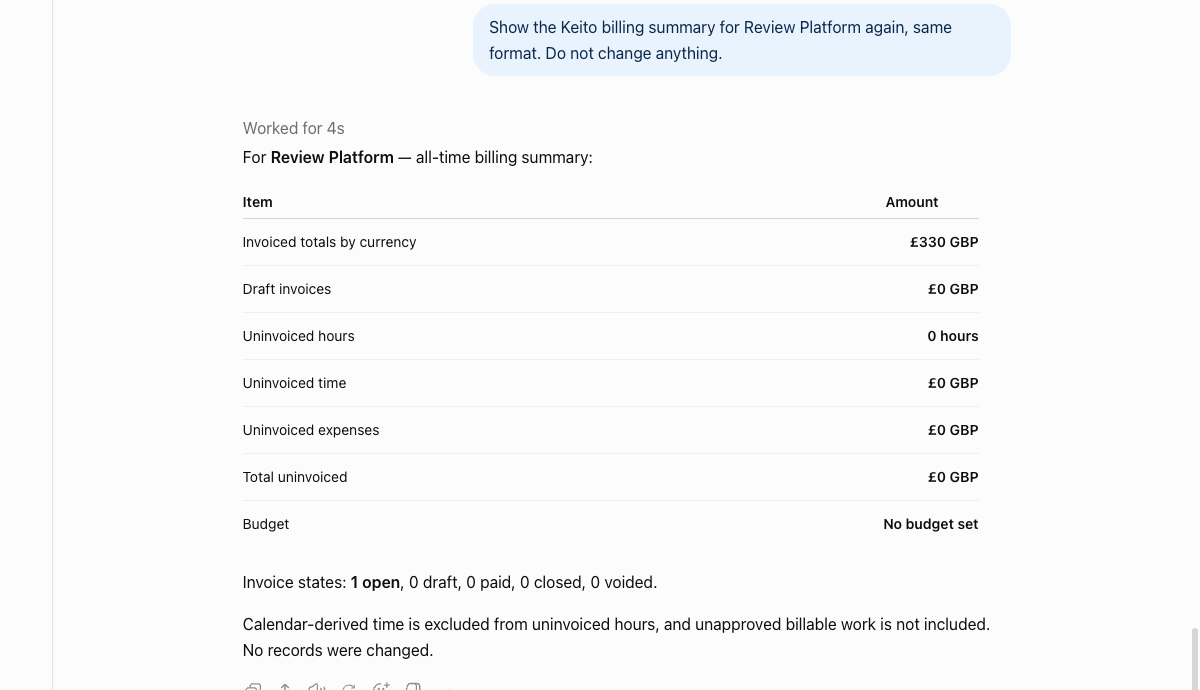
Two things stay out on purpose. Time imported from Google Calendar is excluded from every figure an assistant sees, as it is from the rest of the MCP connector. And a summary never includes another project’s or another workspace’s records: every query behind it is scoped to your company and to the project you named.
Sending an invoice from a chat, safely
Emailing a customer is the one action in this release that cannot be undone, so it has more checks than anything else the connector does.
- Look before you send. The assistant reads the invoice first. Keito returns the exact total, the currency, the line count, the state, and the recipients on file for that client, along with the reasons the invoice cannot be sent yet if any apply.
- Confirm the exact total. The send tool requires the total and currency you were shown. The assistant passes them back to Keito, which compares them with the invoice at that moment. If the invoice has changed since you looked, Keito refuses and nothing is issued.
- Recipients on file only. Invoice emails go to contacts already recorded for that client, or to your own address. An address that is not on file is refused before anything happens; add the contact first.
- One key per action. Every send carries an idempotency key, so a retried request never sends twice and never issues two invoice numbers.
- Rate-limited and switchable. Sends are metered per user, and Keito can switch billing writes off for the connector at any time without touching the rest of the tools.
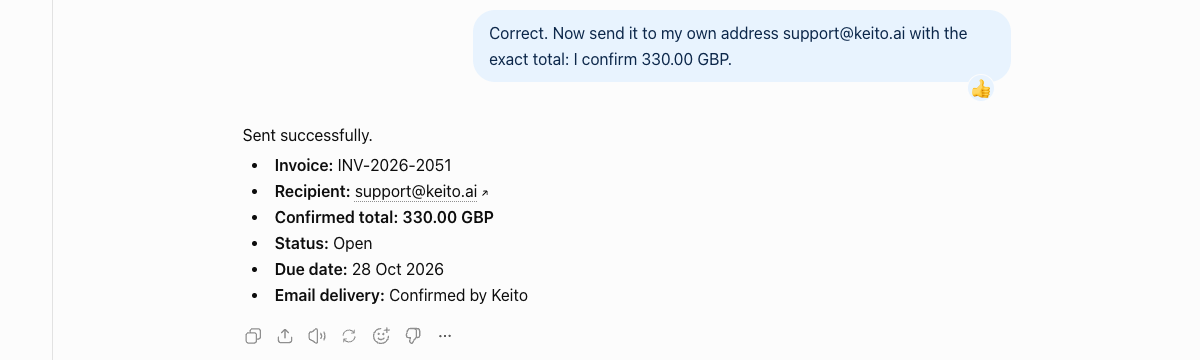
Your assistant adds its own layer on top. ChatGPT, for example, prompts you to allow the send explicitly because the tool is declared as one that leaves the workspace, even when other Keito tools run without a prompt.
Who can use it
Access follows your Keito role, exactly as it does in the web app:
- invoice, estimate and billing-summary tools need a manager or admin with invoice access;
- creating invoice drafts needs the draft-invoice permission, and sending needs the manage-invoices permission;
- creating clients and contacts needs the client-management permission, and creating projects needs the project-management permission.
A member without the right permission still sees the tools listed, but gets a clear message naming the permission instead of data. Workspace admins grant these under Team.
What stays out of the assistant
- Recording payments.
- Editing the line items of an existing invoice or estimate.
- Deleting anything.
- Accepting, declining or converting estimates.
- Any record from a workspace other than the one the connection is bound to.
Those stay in the Keito web app, where the full audit trail and confirmation dialogs live.
Behind the scenes: the API changes
The connector talks to Keito’s public API v2, so everything above is also available to your own integrations.
- New endpoint
GET /api/v2/projects/{id}/billing_summary. - Invoice, invoice-message, contact and estimate creation and estimate mark-as-sent now honour an
Idempotency-Key. POST /api/v2/invoices/{id}/messagesaccepts an optionalconfirmblock; a mismatch returns409 confirmation_mismatchbefore any state change.- Line items on invoices and estimates must reference projects that belong to your workspace and to the document’s client.
GET /api/v2/users/mereports new capability flags so a client can check permissions before acting.
AI-app connections are gated per route with a stable 403 mcp_capability_required error. Personal API keys and Zapier keep their existing behaviour.
Getting started
- ChatGPT: Connect Keito to ChatGPT. If you connected before this release, open the Keito plugin’s settings in ChatGPT and choose Refresh tools so the new tools appear.
- Claude Desktop and Claude Code: Claude Desktop MCP connector.
- Grok Build: Grok Build plugin.
- Every other MCP client: keito.ai/mcp.
Try it with a question you already know the answer to: “Show me the Keito billing summary for our biggest project.” Then draft the next invoice from the uninvoiced time it shows you.
The canonical reference for every tool, permission, and data boundary is the Keito MCP connectors hub and the connector guides linked above.