
Chrome time tracking extensionChrome + Keito
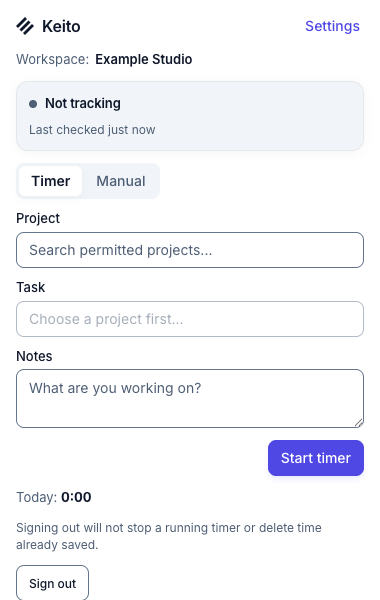
Start a timer or add completed time from the browser toolbar, with optional controls on the work itself.

Overview
Keep the timer within reach
Keito for Chrome puts the same workspace timer in the browser toolbar, so people can start, stop, switch, or add completed time without returning to the Keito app.
Optional site access adds Track with Keito controls to supported GitHub items and linked Basecamp to-dos. You choose whether to enable those buttons, and the toolbar still works without them.
Key features
- Start and stop the shared Keito timer
- Add manual time from the toolbar
- Choose optional access for supported sites
- Save GitHub or Basecamp work context with an entry
How it works
Start tracking from Chrome in three steps
- 1
Install the extension
Add the public Keito Time Tracker listing from the Chrome Web Store.
- 2
Connect Keito
Sign in, choose the intended workspace, and review the available projects.
- 3
Choose site access
Use the toolbar alone or explicitly enable supported GitHub and Basecamp pages.
Chrome + Keito
Keep the timer close to the work
Track time from the browser toolbar without switching back to the Keito app.
- Free 14-day trial
- Cancel anytime
- No per-seat fees
Chrome toolbar
Client research
Keito project
Northstar strategy
Time
0:42