
GitHub time tracking integrationGitHub + Keito
Start a timer or add completed time from a GitHub issue or pull request, with the work reference saved in Keito.

Overview
Keep engineering context attached to time
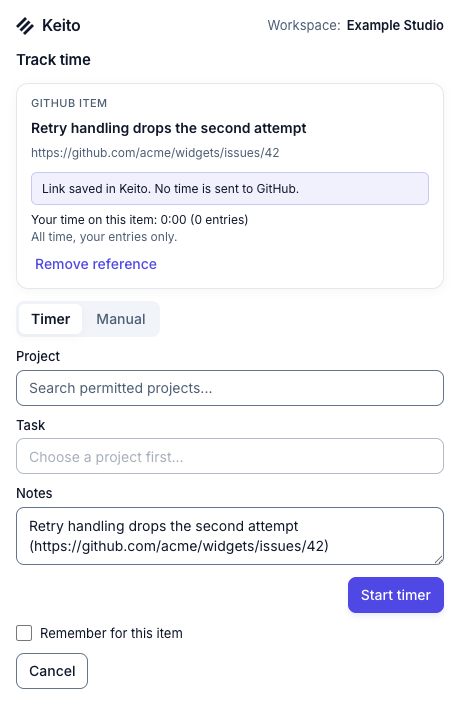
When GitHub access is enabled in Keito for Chrome, a Track with Keito button appears on supported issue and pull request pages. The person reviews the item, chooses an accessible Keito project and task, then starts a timer or saves completed time.
Keito keeps the issue or pull request name, link, and repository with the entry. It never posts hours or comments to GitHub, changes the item, or guesses time from browsing activity.
Key features
- Track from issue and pull request pages
- Save the GitHub link with the entry
- Remember item or repository suggestions
- Keep all time review and billing inside Keito
How it works
Track GitHub work in three steps
- 1
Install Keito for Chrome
Connect the extension to the Keito workspace where time should be saved.
- 2
Enable GitHub
Grant optional access to github.com from the extension settings.
- 3
Track the item
Review the issue or pull request, choose its Keito destination, and record the work.
GitHub + Keito
Connect code delivery to client time
Keep a link to the issue or pull request with every entry so reviewers can see what the time was for.
- Free 14-day trial
- Cancel anytime
- No per-seat fees
Pull request #184
Improve invoice export
Keito project
Web application
Time
2:35