
Zendesk time tracking integrationZendesk + Keito
Record client work from the Zendesk ticket sidebar and keep ticket context attached to the Keito entry.

Overview
Connect support work to client time
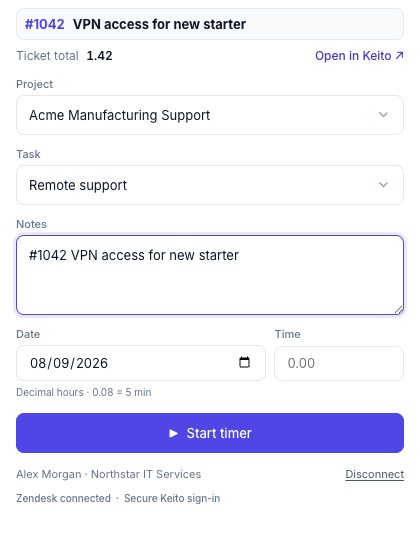
Keito adds a project-based timer and manual-entry form to the Zendesk Support ticket sidebar. Agents select an accessible Keito project and task, then record time with the ticket number, subject, and secure permalink attached as context.
The sidebar shows the Keito time already associated with the ticket and opens the latest accessible entry for review. It never adds worklogs to Zendesk or changes the ticket’s status, assignee, comments, or fields.
Key features
- Start or stop the same timer used across Keito interfaces
- Add completed time for today or an earlier date
- See the total Keito time recorded against a ticket
- Open an accessible linked entry in Keito for review
How it works
Add time tracking to Zendesk in three steps
- 1
Install the Marketplace app
A Zendesk administrator installs Keito and opens it on a non-sensitive test ticket.
- 2
Connect the workspace
A Keito owner or administrator connects the app to the right Keito workspace.
- 3
Connect each agent
Agents sign in with their own Keito accounts and track against projects they can access.
Zendesk + Keito
Connect Zendesk tickets to client time
Track support work from the ticket, then review, report, and bill that time in Keito.
- Free 14-day trial
- Cancel anytime
- No per-seat fees
Ticket #4821
Custom report needs updating
Keito project
Northstar support
Time
0:45