
Toggl Track to Keito importToggl Track to Keito
Choose the dates and projects, preview the import, and move your Toggl Track history into Keito.

Overview
Bring your personal time history into Keito
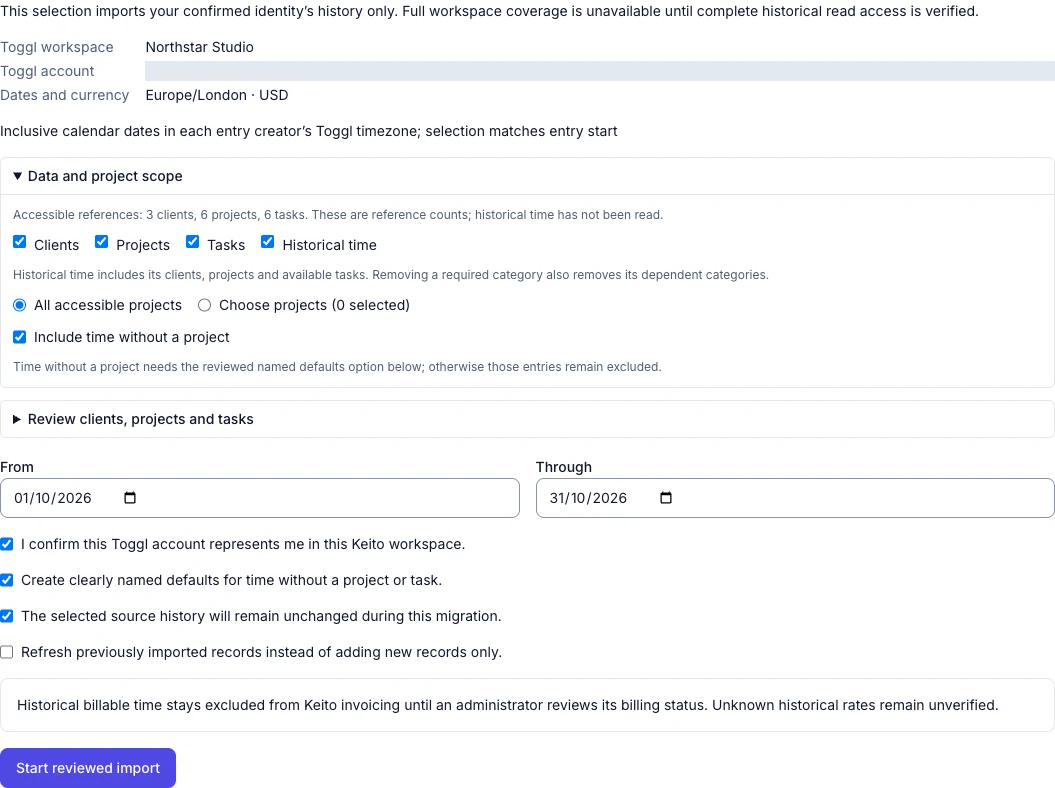
Choose a date range and bring your completed Toggl Track entries into an existing Keito workspace, together with the project information needed to place them correctly.
The import only covers the connected person and does not keep syncing after the move. Owners or administrators choose where the time belongs, follow the import as it runs, and compare the final duration with Toggl Track.
Key features
- Import your own historical time
- Choose the dates and Keito projects before starting
- Follow progress and resume after service limits
- Refresh imported entries without creating duplicates
How it works
Import Toggl history in three steps
- 1
Connect Toggl Track
Connect your Toggl Track account and choose the workspace that holds your history.
- 2
Review the import
Choose the dates and where each project should appear in Keito.
- 3
Import and compare
Follow the progress, review the result, and compare the total time with Toggl Track.
Toggl Track to Keito
Move your time history with confidence
Keep Toggl Track unchanged while you review exactly what arrives in Keito.
- Free 14-day trial
- Cancel anytime
- No per-seat fees
Importing from
Toggl Track
91%
Imported
2,184 entries
Remaining
216 entries