
Permissions Reference
This page collects every control that affects what a client member can see, who can change it, and its default.
Roles
| Role | Description |
|---|---|
| Owner | The workspace owner. Has every administrator capability, and owner permissions cannot be reduced. |
| Administrator | An internal member with the Administrator access level. |
| Manager | An internal member with the Manager access level plus any granular manager permissions enabled on their Team profile. |
| Member | An internal member (employee or contractor) with the Member access level. |
| Client | An external member with the Client member type. Always a Member; cannot hold internal roles or manager permissions. |
See Roles & Permissions for how access levels and manager permissions are assigned.
Who can configure what
| Action | Owner | Administrator | Manager | Member | Client |
|---|---|---|---|---|---|
| Invite a client to a project (Invite someone to this project with Invite as: Client) | Yes | Yes | No | No | No |
| Invite a client from Team → Invite person | Yes | Yes | No | No | No |
| Set Track time for a project member | Yes | Yes | On projects they manage¹ | No | No |
| Set Client view and Internal costs for a project member | Yes | Yes | On projects they manage, with billable-rate access² | No | No |
| Workspace defaults Client view: budget remaining and Client view: uninvoiced amounts | Yes | Yes | No | No | No |
| Per-project Client view overrides (Budget remaining, Uninvoiced amounts) | Yes | Yes | On projects they manage, with billable-rate access² | No | No |
| Client portal card: tick Invoices and Retainers, Save portal access, Copy sign-in link, Revoke access | Yes | Yes | No | No | No |
| Invoice statement link card | Yes | Yes | With Send and fully manage all invoices for projects they manage | No | No |
| Edit the client record (name, address, currency, invoice settings) | Yes | Yes | With Create and edit all clients and tasks on the account | No | No |
¹ A manager can edit a project when they have Manages project on it and the Create projects, and edit projects that they manage permission.
² Billable-rate access is the manager permission See and edit billable rates and amounts for projects and people they manage. Without it, the Client view and Internal costs toggles and the Client view section selects are not shown.
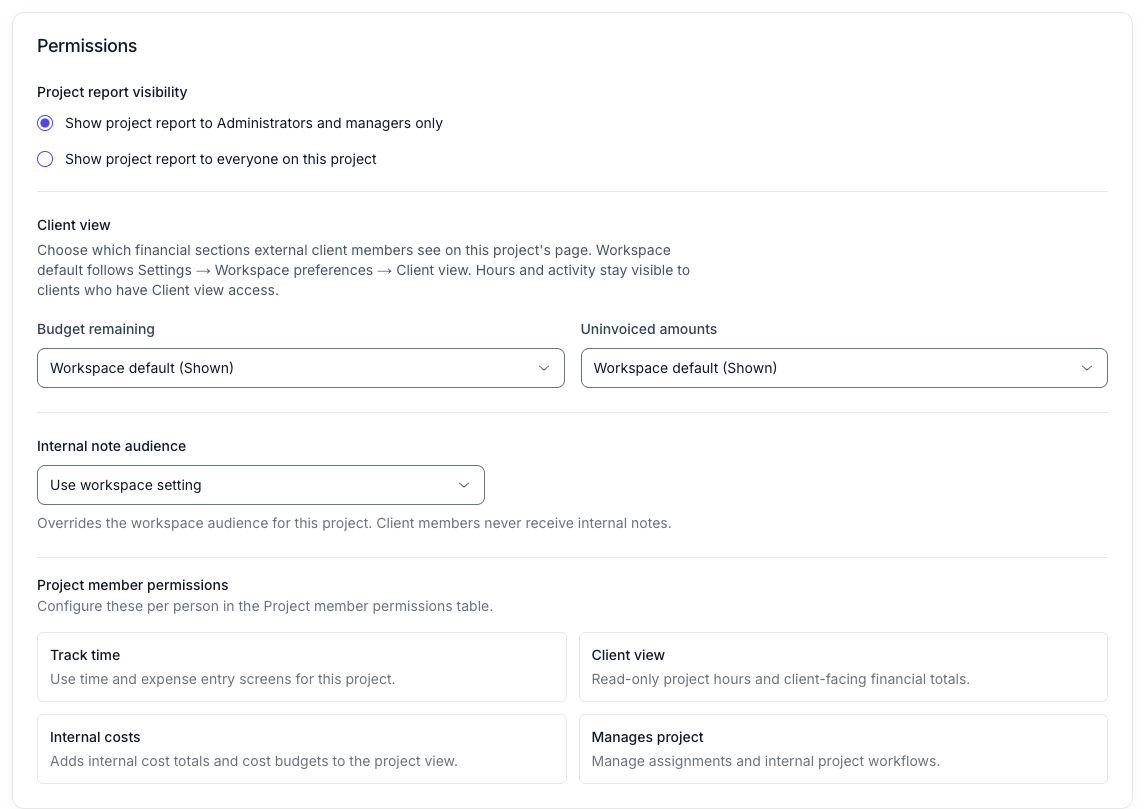
The following screenshot shows the Permissions card an administrator sees on the Edit project page:
What a client member can open
| Surface | Condition |
|---|---|
| Dashboard | Always |
| Projects list | Always; lists only projects with an active assignment |
| A project’s activity, hours, and billable totals | Client view on for that assignment |
| Budget remaining sections on a project | Client view on, and the resolved Budget remaining setting is shown |
| Uninvoiced amounts sections on a project | Client view on, and the resolved Uninvoiced amounts setting is shown |
| Internal costs on a project | Internal costs on for that assignment (not recommended for clients) |
| Time and expense entry for a project | Track time on for that assignment |
| Invoices | Invoices ticked in the Client portal card for that client |
| Retainers | Retainers ticked in the Client portal card for that client |
| Invoice documents (PDF, print, pay online) | From a portal invoice row, an emailed invoice link, or an Invoice statement link |
| Settings (own preferences) and Profile | Always |
| Time, Expenses, Reports, Manage, Team, invoice management, integrations, API keys | Never |
Every option and its default
| Option | Where | Values | Default |
|---|---|---|---|
| Member type | Project invite (Invite as) or Team → Invite person | Client, Employee, Contractor | Client when inviting from a project |
| Track time | Project member permissions | On, Off | Off for clients |
| Client view | Project member permissions | On, Off | On for clients |
| Internal costs | Project member permissions | On, Off | Off for clients; turning it on also turns on Client view |
| Manages project | Project member permissions | On, Off | Off |
| Client view: budget remaining | Settings → Preferences → Workspace preferences | Shown, Hidden | Shown |
| Client view: uninvoiced amounts | Settings → Preferences → Workspace preferences | Shown, Hidden | Shown |
| Budget remaining | Edit project → Permissions → Client view | Workspace default, Show to clients, Hide from clients | Workspace default |
| Uninvoiced amounts | Edit project → Permissions → Client view | Workspace default, Show to clients, Hide from clients | Workspace default |
| Invoices | Manage → Clients → Client portal → Portal sections | Ticked, Unticked | Ticked for a person not enabled before |
| Retainers | Manage → Clients → Client portal → Portal sections | Ticked, Unticked | Unticked |
| Portal access | Manage → Clients → Client portal | Saved, Revoked | Not enabled until saved |
| Invoice statement link | Manage → Clients → Invoice statement link | Created, Replaced, Disabled | None |
Notes
- Portal access is checked on every request. Revoking access, archiving the member, or archiving the client organisation takes effect on their next page load.
- Client members are never offered internal roles, and a person converted to a client cannot be converted back to an employee or contractor.
- Client members cannot create API keys, so the Keito API is unaffected by these settings.