
Invoices & Retainers
Both sections are optional and are enabled per client user; see Enabling the Portal. Everything here is read-only. Amounts are shown in the currency of each invoice or retainer.
Invoices
Invoices lists the invoices issued to the client organisation.
| Filter | Shows |
|---|---|
| Outstanding (default) | Open invoices with a balance still due |
| Paid | Invoices that have been marked as paid |
| All | Both of the above |
Each row shows the invoice number, an Outstanding or Paid badge, the invoice subject (or the issue date when there is no subject), the invoice total, and, for outstanding invoices, the amount still due. Lists longer than 25 invoices are paged with Previous and Next.
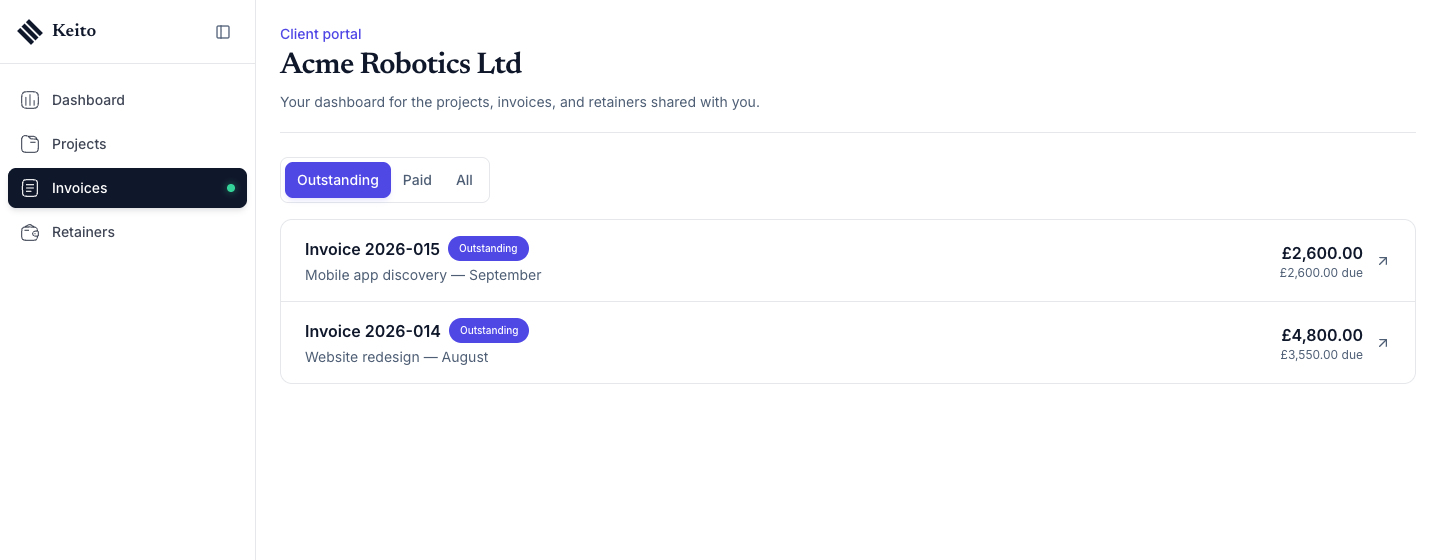
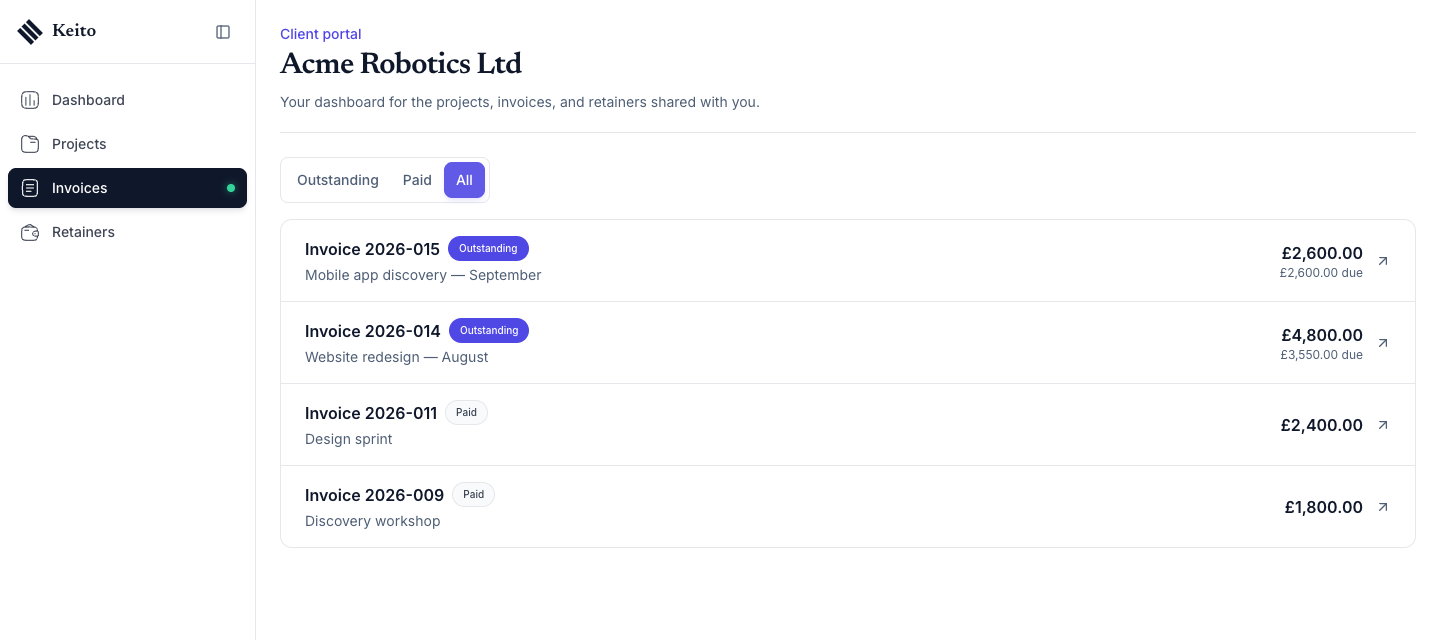
Clicking a row opens the invoice document in a new tab. This is the same public document your client receives by email, with PDF, print, and online payment where you have enabled it.
Never listed
The portal only lists issued invoices the client can act on or has settled. It never shows:
- Draft invoices.
- Closed (written-off) invoices.
- Voided invoices.
- Open invoices with nothing due, or with a negative balance.
- Invoices for any other client organisation or workspace.
If Invoices is switched off while the client is on the page, they see “Invoice access is not enabled”.
Retainers
Retainers shows a card for each retainer the client has funded.
Which retainers appear depends on the retainer’s scope:
- Client-wide retainers, labelled All client projects, are always included for that client organisation.
- Project retainers are included only when the client user is assigned to the project the retainer covers. The project name is shown under the retainer name.
Each card shows the retainer status, the Available balance, and the most recent activity:
- Funds added, with the amount.
- Used for invoice, with a link to the invoice when Invoices is also enabled and that invoice is visible in the portal. Otherwise the amount is shown instead.
- Adjustment, with the amount.
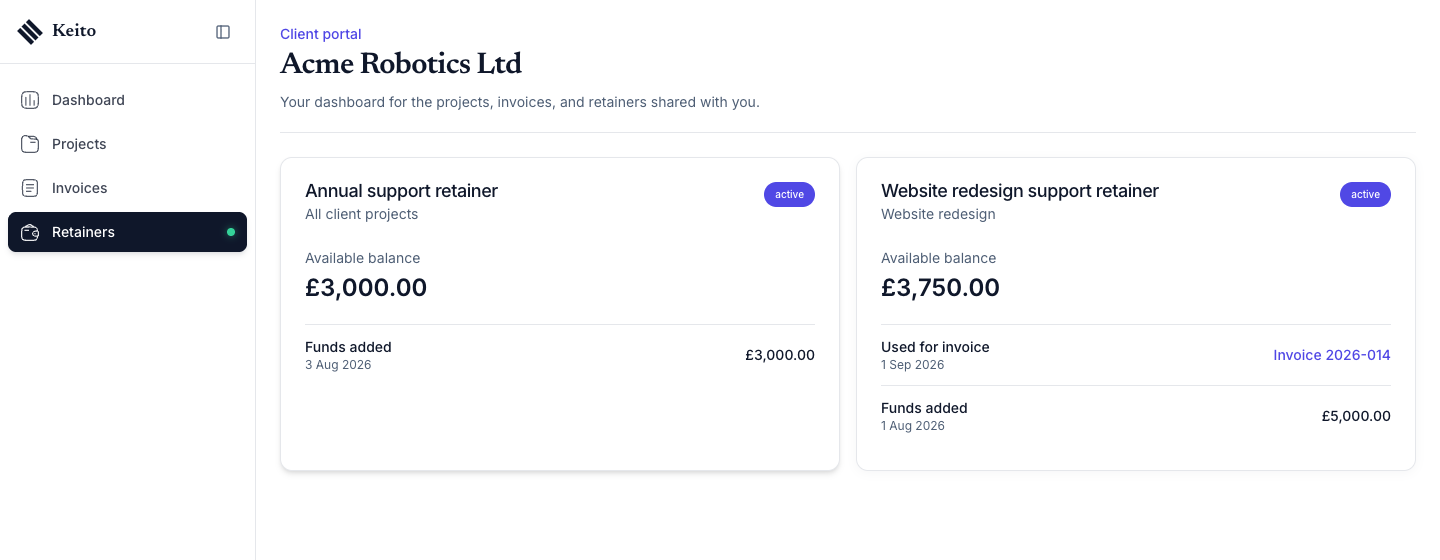
Draws recorded against draft invoices are left out of both the activity list and the balance until the invoice is issued, so the portal never reveals an invoice you have not sent.
Dashboard counts
The Outstanding invoices card on the Dashboard counts open invoices with a balance due, and the Active retainers card counts active retainers in scope for that person. Each card appears only when its section is enabled.
Emailed links for signed-in clients
Two kinds of links you already share keep working, but become aware of the portal:
- The invoice link in invoice emails (
app.keito.ai/invoice/…). - The Invoice statement link created from Manage → Clients (
app.keito.ai/statement/…).
When the person opening the link is signed in to Keito as an active client member of your workspace, belongs to the invoice’s client organisation, and has Invoices enabled in the Client portal card, Keito takes them to their portal Invoices list instead of the stand-alone page: Outstanding for an open invoice or a statement link, Paid for a paid invoice. The link’s key or token is not carried into the portal address.
In every other case the link works exactly as before and shows the public page:
- The visitor is not signed in.
- They are signed in as an internal member of your workspace.
- They are a client member of a different client organisation or a different workspace.
- Invoices is not enabled for them.
- The invoice is a draft, closed, voided, or has nothing due.
Keito never reveals whether a portal exists to a visitor who is not eligible. From inside the portal, invoice rows open the document directly, so a client can always reach the PDF and payment options.