Install Keito for Mac
Keito for Mac puts the timer in your menu bar, so you can start and stop work without keeping a browser tab open.
Using Windows? See Install Keito for Windows. On Linux? See Install Keito for Linux.
The download is a universal Mac app for Apple silicon and Intel Macs. It is signed by OSO DevOps Limited, notarized by Apple, and updates itself after installation.
1. Open the download
Open Keito-universal.dmg from your browser’s downloads list or your Downloads folder.
2. Move Keito to Applications
Drag the Keito icon onto the Applications folder.
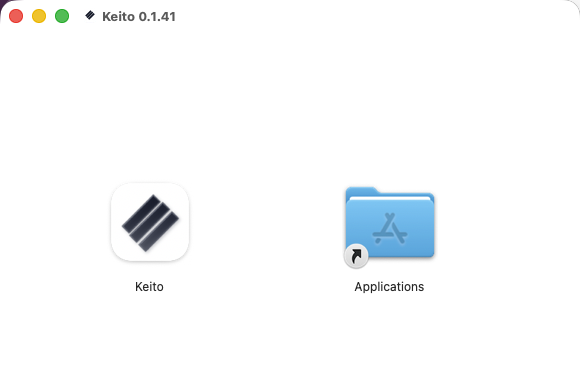
If macOS asks whether to replace an existing copy, quit Keito from its menu-bar menu and choose Replace.
3. Open Keito
Open your Applications folder and double-click Keito.
The first time you open it, macOS confirms that the app was downloaded from the internet and checked by Apple. Click Open.
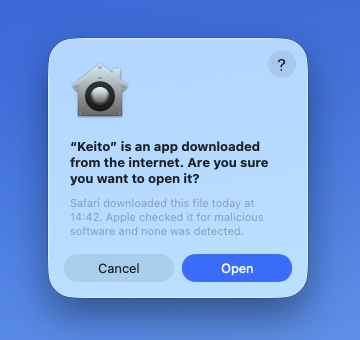
4. Sign in
Keito appears in the menu bar at the top of the screen. Open it and sign in with the same account you use at app.keito.ai.
You can enable Launch Keito at login during setup or later in Settings.
Updates
The direct-download version of Keito checks for signed updates automatically. You can choose whether updates download in the background and when to install them.
If macOS will not open Keito
Do not bypass a warning that says the app is damaged, modified, or cannot be checked for malicious software.
- Delete that copy of Keito.
- Download it again using the button at the top of this guide.
- Make sure the confirmation says Apple checked the app for malicious software.
- If the warning continues, contact Keito support and include a screenshot.
Uninstall Keito
Quit Keito from its menu-bar menu, then move Keito from Applications to the Bin. Removing the Mac app does not delete your Keito workspace or cloud data.